Understanding process and interrupt contexts
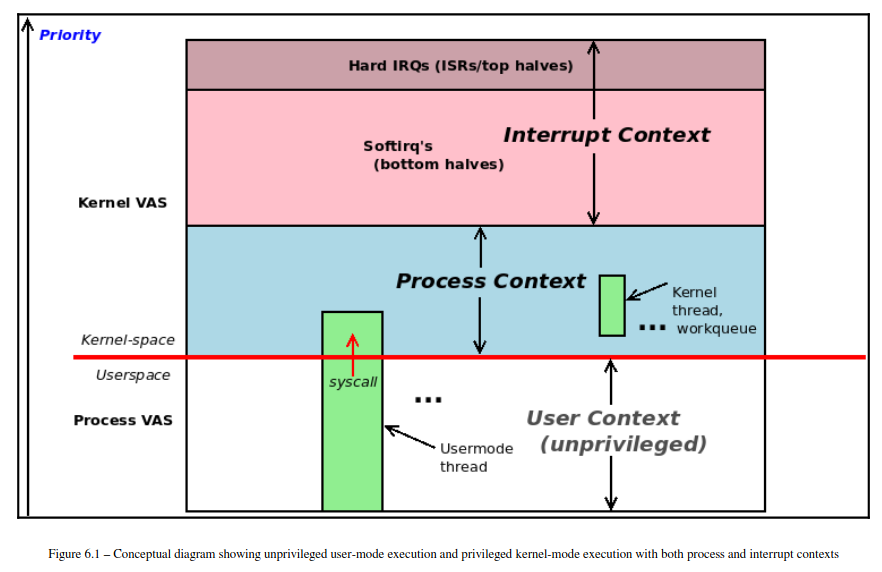 各種 context 有以下的分類
- kernel code
- interrupt context: 可能是來自於 hard ware 的 interrupt
- process context: 來自於 system call 或是 exception
- user space
- user context
在接下來的內容中,可以留意現在是在討論這三種 context 的那一個分類裡
Understanding the basics of the process VAS
大致上一個 process 的 virtual address space 長成下面這個樣子
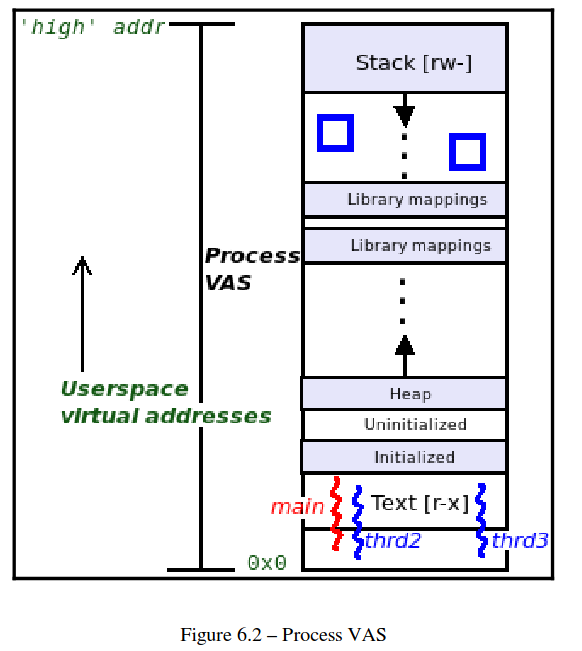
- Text segment: 這是 machine code 存放的地方
- Data segment
- Initialized data segment: 已經初始化的變數
- Uninitialized data segment: 還沒有被初始化的變數,有時候會被稱為 bss
- Heap segment: 被
malloc()或是mmap()出來的區域會放在這裡 - Libraries (text, data)
- Stack: 這個區域會對應到 function call 的過程
Organizing processes, threads, and their stacks – user and kernel space
thread 可以想成是 registers + stack 的組合,其他的資源都是跟 process 共用的 這本書會把重點著重於 thread 因為在最原始的 Unix 理念中
Everything is a process; if it’s not a process, it’s a file
這句話雖然在當今也算是正確的,不過
The thread, not the process, is the kernel schedulable entity
在當今會更加貼切一些
每一個 thread 都會有一個對應的 task structure (也被稱為 process descriptor)
下一個重點為:
we require one stack per thread per privilege level supported by the CPU
所以可以得到下一個結論
every user space thread alive has two stacks
- A user space stack
- A kernel space stack: 進入到 kernel mode 之後才會用這個 stack
但如果是 kernel thread 的話,就只會有一個 kernel thread
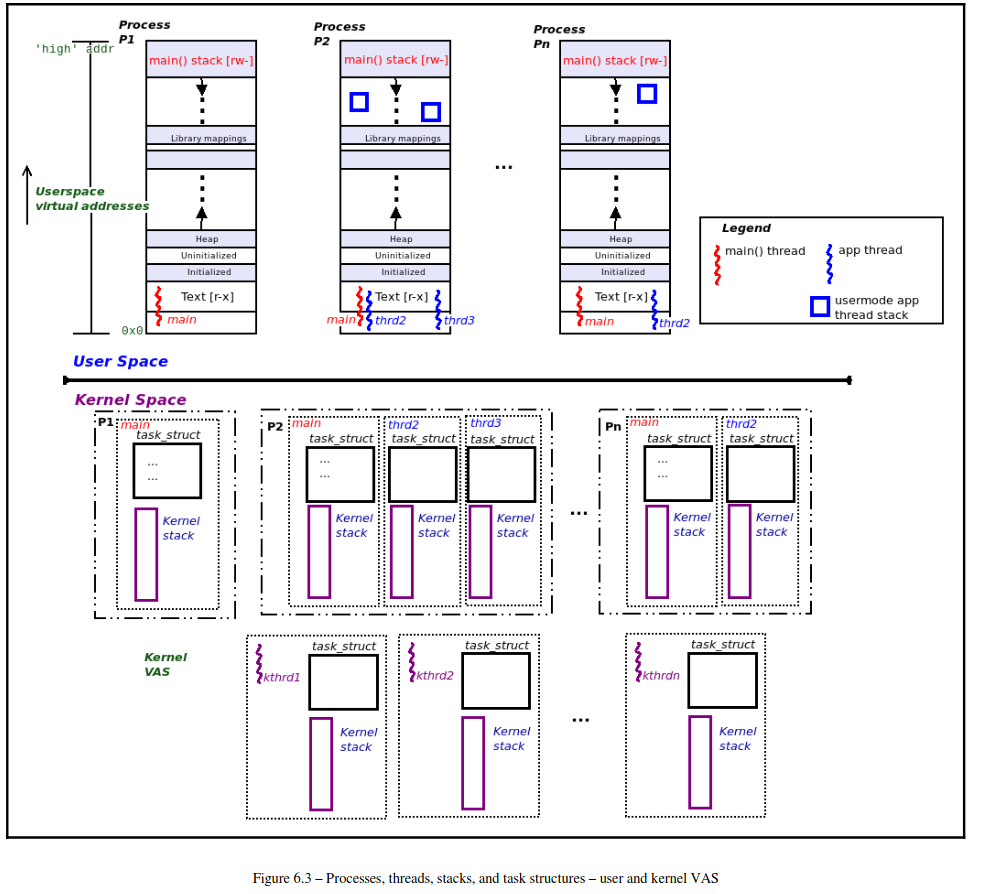
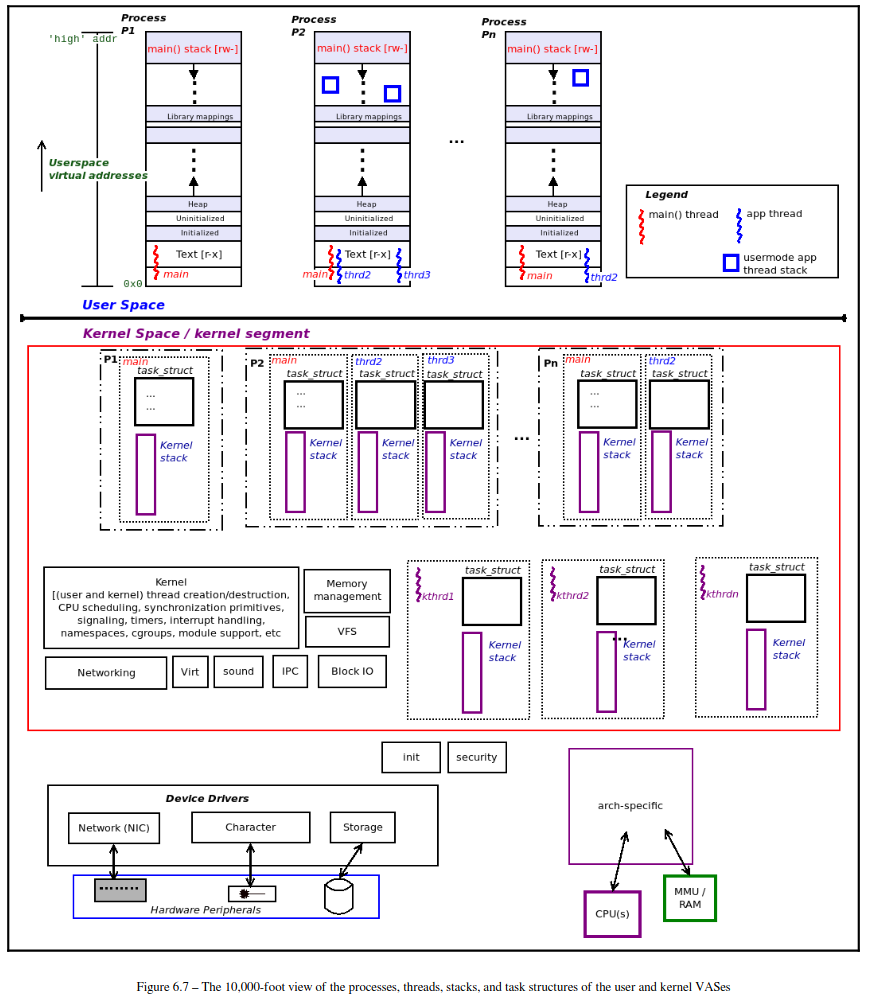
整個架構長成這個樣子
cd ~/Linux-Kernel-Programming/ch6/
./countem.sh
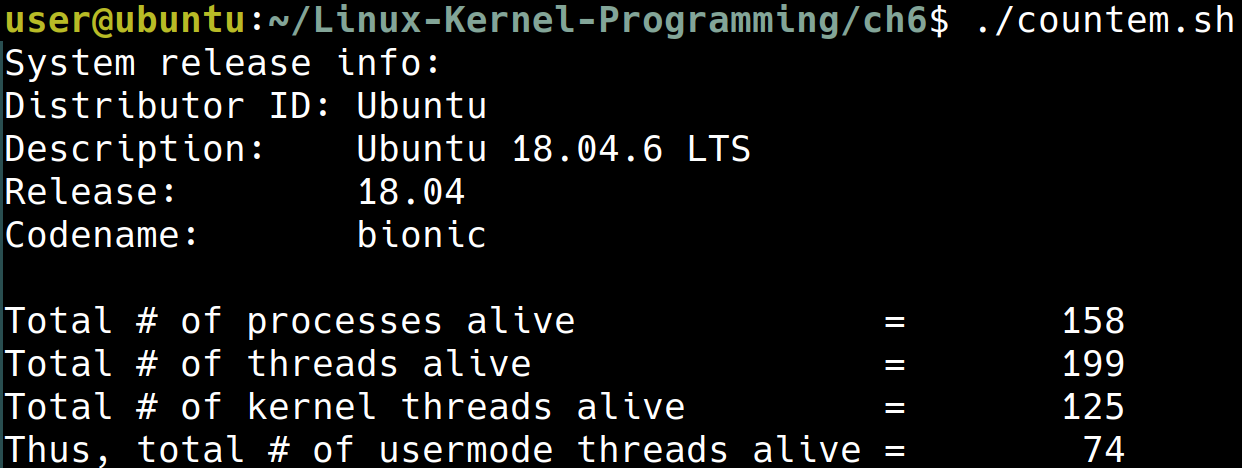 從上面的計算可以看到
# of total threads == # of kthread + # of uthread
User space organization
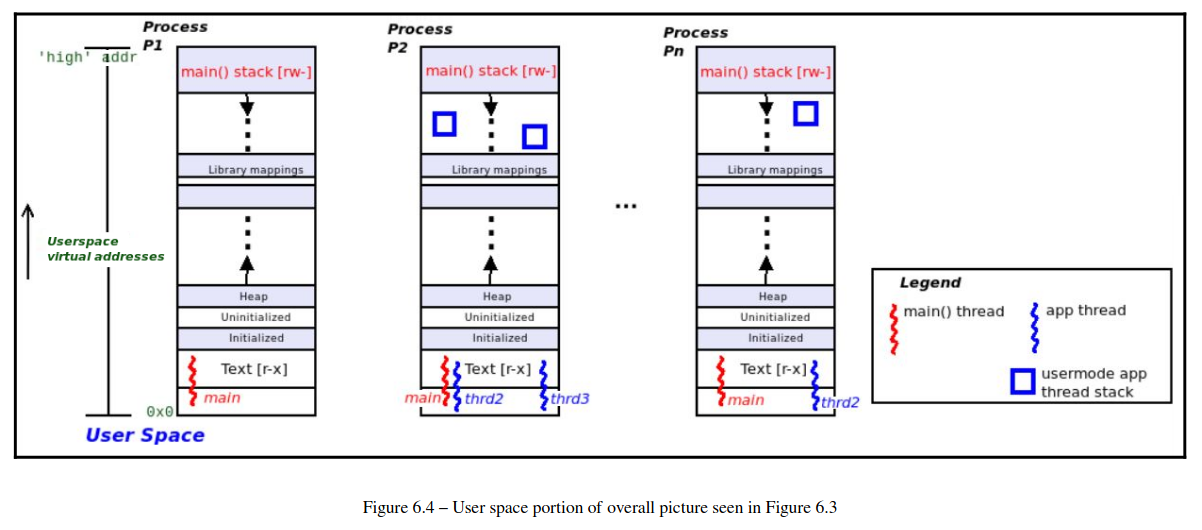 先來看 user space 的部份,每一個 process 都一定會有一個 main thread,並且每一個 process 可以有多個 thread
每一個 process 大致上會有以下的區塊:
- Text: code
r-x - Data segments:
rw-這裡包含- itialized data segment
- unitialized data segment (or
bss) - ‘upward-growing’ heap
- Library mappings
- Downward-growing stack(s)
每一個 user space thread 都會有對應的 user space stack 與 kernel space stack
Kernel space organization
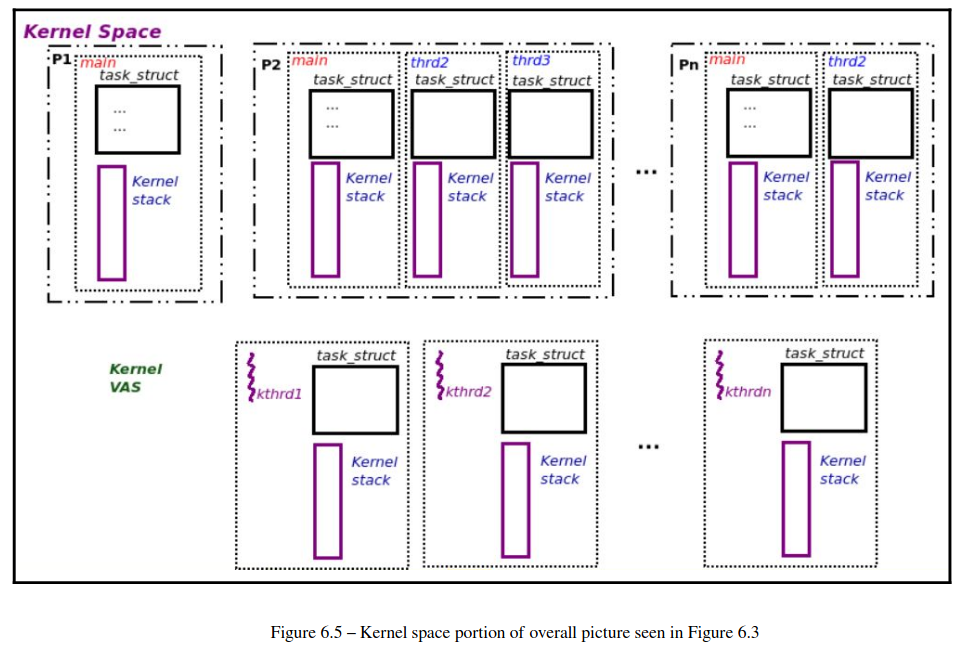
這裡的 kernel thread 只有一個 kernel-mode stack
Summarizing the current situation
- Task structures:
- 每一個 thread (user or kernel) 都有一個相對應的 task struct
- Stacks:
- 一個 user mode thread 會有兩個 stack
- 一個 user mode stack
- 一個 kernel mode stack
- 一個純粹的 kernel mode thread 就只有一個 kernel mode stack
- 一個 user mode thread 會有兩個 stack
Viewing the user and kernel stacks
在 debug 的時候很需要觀察 stack 裡面裝了什麼,因為 stack 中紀錄了當前的 execution context
Traditional approach to viewing the stacks
Viewing the kernel space stack of a given thread or process
(base) user@thinkpad:~$ pgrep bash
8762
(base) user@thinkpad:~$ sudo cat /proc/8762/stack
[<0>] do_wait+0x171/0x310
[<0>] kernel_wait4+0xaf/0x150
[<0>] __do_sys_wait4+0x89/0xa0
[<0>] __x64_sys_wait4+0x1c/0x30
[<0>] x64_sys_call+0x1c2e/0x1fa0
[<0>] do_syscall_64+0x56/0xb0
[<0>] entry_SYSCALL_64_after_hwframe+0x6c/0xd6
或者直接使用
(base) user@thinkpad:~$ sudo cat /proc/$(pgrep bash)/stack
[<0>] do_wait+0x171/0x310
[<0>] kernel_wait4+0xaf/0x150
[<0>] __do_sys_wait4+0x89/0xa0
[<0>] __x64_sys_wait4+0x1c/0x30
[<0>] x64_sys_call+0x1c2e/0x1fa0
[<0>] do_syscall_64+0x56/0xb0
[<0>] entry_SYSCALL_64_after_hwframe+0x6c/0xd6 # <-- stack bottom
要注意這裡的輸出跟 memory 的排列是相反的,以我這裡的例子來說 entry_SYSCALL_64_after_hwframe 處在 stack bottom 的位置
這裡的輸出代表 bash 正在執行 do_wait() 並且這是透過 system call 呼叫到這裡來的
Viewing the user space stack of a given thread or process
這裡有點諷刺的是,查看 user space stack 比 kernel space stack 還要困難
user@thinkpad:~$ sudo gdb -p 8762 -batch -ex "thread apply all bt"
Thread 1 (Thread 0x7f29b6a09740 (LWP 8762) "bash"):
#0  0x00007f29b6af63ea in __GI___wait4 (pid=-1, stat_loc=0x7ffc2376e500, options=10, usage=0x0) at ../sysdeps/unix/sysv/linux/wait4.c:30
#1  0x0000556331e9b135 in ?? ()
#2  0x0000556331dfb6a2 in wait_for ()
#3  0x0000556331de37aa in execute_command_internal ()
#4  0x0000556331de41b8 in execute_command ()
#5  0x0000556331dd53cb in reader_loop ()
#6  0x0000556331dc6c46 in main ()
[Inferior 1 (process 8762) detached]
[e]BPF – the modern approach to viewing both stacks
前面的作法都是比較老一點的作法,現在比較常見的方式是用 eBPF
sudo stackcount-bpfcc -p 29819 -r ".*malloc.*" -v -d
The 10,000-foot view of the process VAS
Understanding and accessing the kernel task structure
每一個 thread 都有一個相對應的 task struct,他紀錄的這個 thread 的基本資料
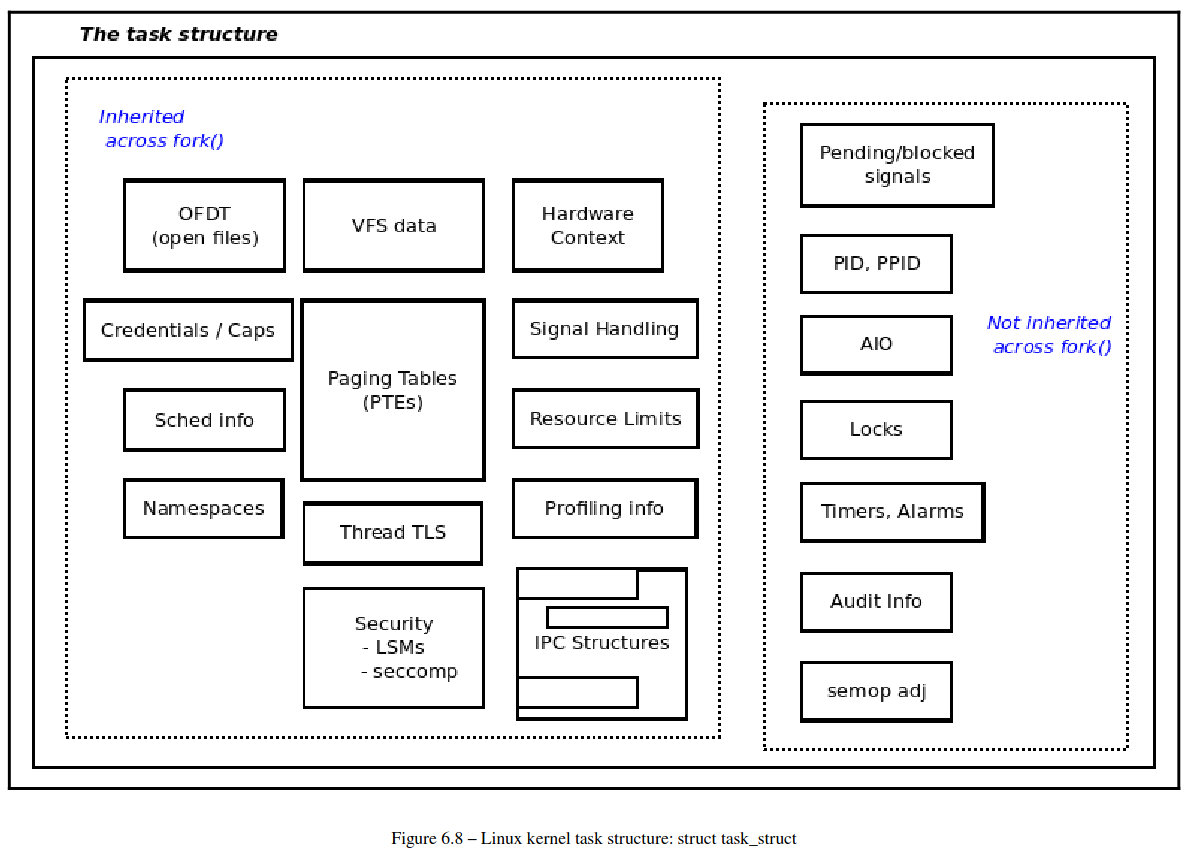
Looking into the task structure
task_struct 實際上定義在 include/linux/sched.h 中
cd $(KSRC)
vim include/linux/sched.h
這裡看完 1. 原始碼 2. 書上對於原始碼的註記會對於 task_struct 比較有感覺
Accessing the task structure with current
使用 current 這個 macro 可以找到 task_struct 的內容,current 的實做非常 architecture-specific
user@ubuntu:~/kernels/linux-5.4/arch$ find . -name "current.h"
./x86/include/asm/current.h
./xtensa/include/asm/current.h
./nds32/include/asm/current.h
./ia64/include/asm/current.h
./arc/include/asm/current.h
./microblaze/include/asm/current.h
./arm64/include/asm/current.h
./powerpc/include/asm/current.h
./m68k/include/asm/current.h
./riscv/include/asm/current.h
./sparc/include/asm/current.h
./s390/include/asm/current.h
例如 arm64 的實做:
/* SPDX-License-Identifier: GPL-2.0 */
#ifndef __ASM_CURRENT_H
#define __ASM_CURRENT_H

#include <linux/compiler.h>

#ifndef __ASSEMBLY__

struct task_struct;

/*
 * We don't use read_sysreg() as we want the compiler to cache the value where
 * possible.
 */
static __always_inline struct task_struct *get_current(void)
{
    unsigned long sp_el0;

    asm ("mrs %0, sp_el0" : "=r" (sp_el0));

    return (struct task_struct *)sp_el0;

}

#define current get_current()

#endif /* __ASSEMBLY__ */

#endif /* __ASM_CURRENT_H */
使用方式如下:
#include <linux/sched.h>
current->pid, current->comm
Determining the context
Kernel code 會跑在下面兩種 context
- Process (or task) context
- Interrupt (or atomic) context
#include <linux/preempt.h>
in_task()
in_task() 回傳一個 boolean
- return
true: process context (通常可以在這個情況下 sleep) - return
false: interrupt context (不可以在這個情況下 sleep)
current is only considered valid when running in process context
Working with the task structure via current
cd /home/user/Linux-Kernel-Programming/ch6/current_affairs
vim current_affairs.c
/*
 * ch6/current_affairs/current_affairs.c
 ***************************************************************
 * This program is part of the source code released for the book
 *  "Linux Kernel Programming"
 *  (c) Author: Kaiwan N Billimoria
 *  Publisher:  Packt
 *  GitHub repository:
 *  https://github.com/PacktPublishing/Linux-Kernel-Programming
 *
 * From: Ch 6: Kernel and Memory Management Internals -Essentials
 ****************************************************************
 * Brief Description:
 *
 * For details, please refer the book, Ch 6.
 */
#include <linux/init.h>
#include <linux/module.h>
#include <linux/kernel.h>
#include <linux/sched.h>    /* current() */
#include <linux/preempt.h>  /* in_task() */
#include <linux/cred.h>     /* current_{e}{u,g}id() */
#include <linux/uidgid.h>   /* {from,make}_kuid() */

#define OURMODNAME   "current_affairs"

MODULE_AUTHOR("Kaiwan N Billimoria");
MODULE_DESCRIPTION("LKP book:ch6/current_affairs: display a few members of"
" the current process' task structure");
MODULE_LICENSE("Dual MIT/GPL");
MODULE_VERSION("0.1");

static inline void show_ctx(char *nm)
{
    /* Extract the task UID and EUID using helper methods provided */
    unsigned int uid = from_kuid(&init_user_ns, current_uid());
    unsigned int euid = from_kuid(&init_user_ns, current_euid());

    pr_info("%s:%s():%d ", nm, __func__, __LINE__);
    if (likely(in_task())) {
        pr_info("%s: in process context ::\n"
            " PID         : %6d\n"
            " TGID        : %6d\n"
            " UID         : %6u\n"
            " EUID        : %6u (%s root)\n"
            " name        : %s\n"
            " current (ptr to our process context's task_struct) :\n"
            "               0x%pK (0x%px)\n"
            " stack start : 0x%pK (0x%px)\n", nm,
            /* always better to use the helper methods provided */
            task_pid_nr(current), task_tgid_nr(current),
            /* ... rather than the 'usual' direct lookups:
             * current->pid, current->tgid,
             */
            uid, euid,
            (euid == 0 ? "have" : "don't have"),
            current->comm,
            current, current,
            current->stack, current->stack);

    } else
        pr_alert("%s: in interrupt context [Should NOT Happen here!]\n", nm);

}

static int __init current_affairs_init(void)
{
    pr_info("%s: inserted\n", OURMODNAME);
    pr_info(" sizeof(struct task_struct)=%zd\n", sizeof(struct task_struct));
    show_ctx(OURMODNAME);
    return 0;       /* success */

}

static void __exit current_affairs_exit(void)
{
    show_ctx(OURMODNAME);
    pr_info("%s: removed\n", OURMODNAME);

}

module_init(current_affairs_init);
module_exit(current_affairs_exit);
從這個範例可以看到要如何使用 current,注意看這裡會使用像是
#include <linux/sched.h>    /* current() */

[...]
current->comm,
current, current,
current->stack, current->stack
[...]
這種用法,current 在 #include <linux/sched.h> 之後,可作為一個 macro 使用
這裡的用意在於列印出當前這個 process 的 task_struct
Built-in kernel helper methods and optimizations
Trying out the kernel module to print process context info
cd ~/Linux-Kernel-Programming/ch6/current_affairs/
make
sudo dmesg -C
sudo insmod ./current_affairs.ko
dmesg
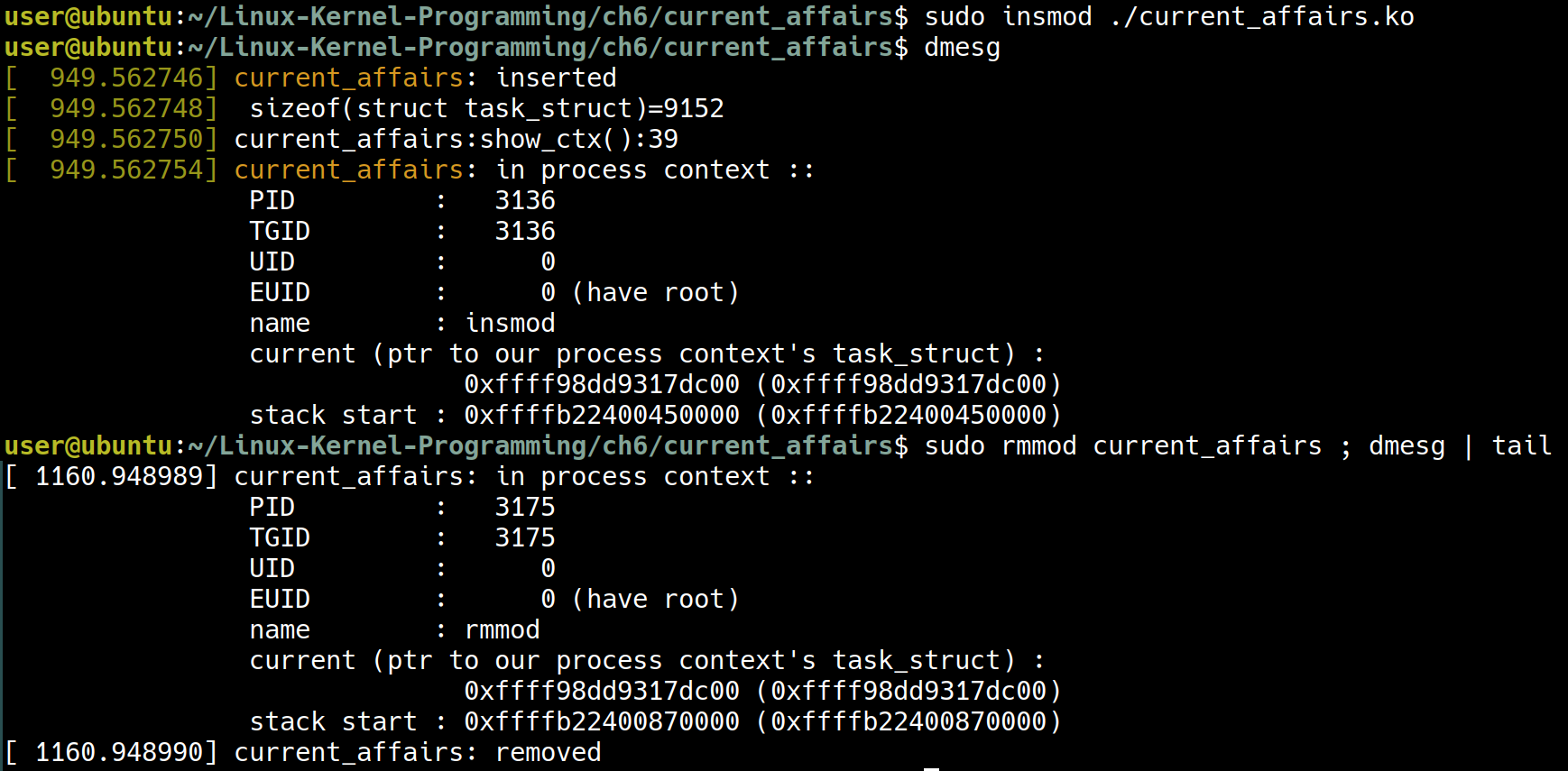 如同這份 code 所預期的,列印出一些當前 process 的資訊
Seeing that the Linux OS is monolithic
Coding for security with printk
Iterating over the kernel’s task lists
所有的 task_struct 是用一個 linked list 存放在 include/linux/types.h:list_head 中
cd ${KSRC}/include/linux/
vim ${KSRC}/include/linux/types.h
struct list_head {
    struct list_head *next, *prev;
};
針對這個 list 的操作,include/linux/signal.h 中提供了很多 macro 可以使用
vim /home/user/kernels/linux-5.4/include/linux/signal.h
接下來會來嘗試完成以下兩個任務
- One: Iterate over the kernel task list and display all processes alive.
- Two: Iterate over the kernel task list and display all threads alive
Iterating over the task list I – displaying all processes
~/Linux-Kernel-Programming/ch6/foreach/prcs_showall
make
sudo dmesg -C
sudo insmod ./prcs_showall.ko
sudo rmmod prcs_showall
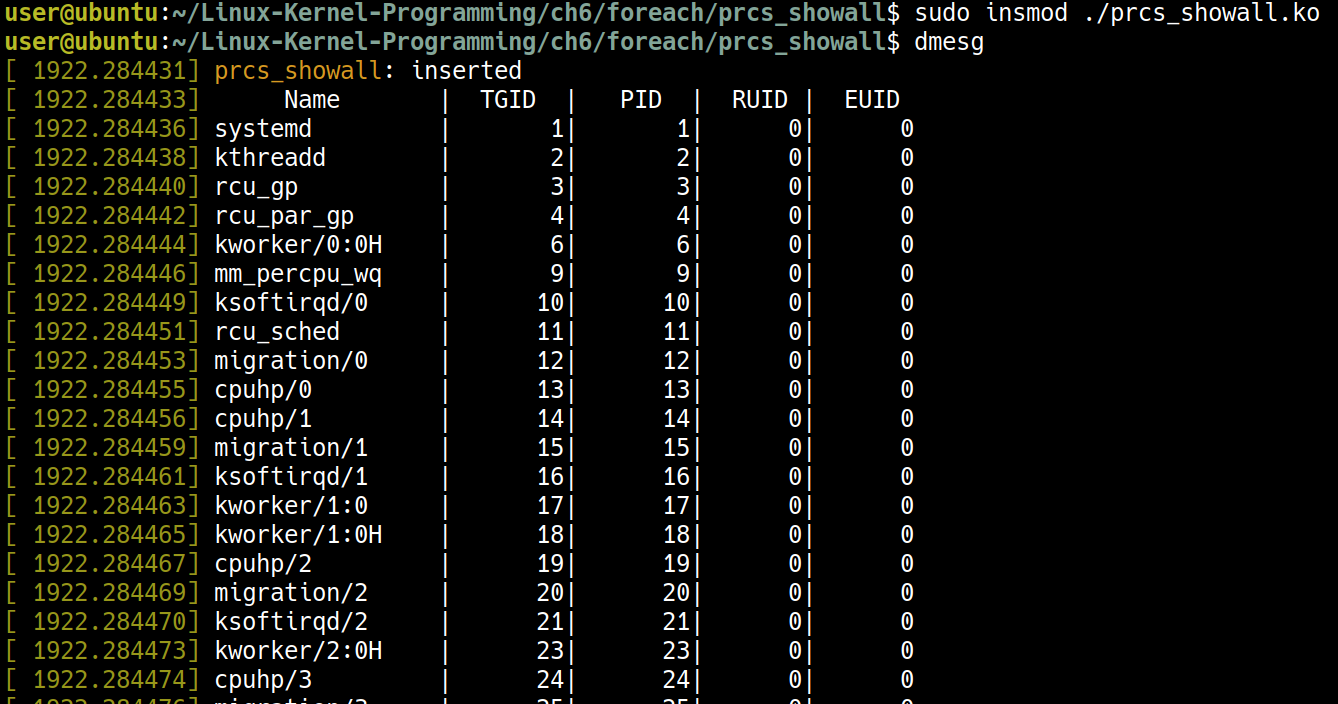
這裡可以對照 prcs_showall.c 與 signal.h
vim ~/Linux-Kernel-Programming/ch6/foreach/prcs_showall/prcs_showall.c
vim ${KSRC}/include/linux/sched/signal.h
重點在於 signal.h 的 for_each_process()
#define for_each_process(p) \
    for (p = &init_task ; (p = next_task(p)) != &init_task ; )
跟 prcs_showall.c 中的使用
[...]
    rcu_read_lock();
    for_each_process(p) {
        memset(tmp, 0, 128);
        n = snprintf(tmp, 128, "%-16s|%8d|%8d|%7u|%7u\n", p->comm, p->tgid, p->pid,
                 /* (old way to disp credentials): p->uid, p->euid -or-
                  * current_uid().val, current_euid().val
                  * better way using kernel helper __kuid_val():
                  */
                 __kuid_val(p->cred->uid), __kuid_val(p->cred->euid)
            );
        numread += n;
        pr_info("%s", tmp);
        //pr_debug("n=%d numread=%d tmp=%s\n", n, numread, tmp);

        cond_resched();
        total++;

    }           // for_each_process()
    rcu_read_unlock();
[...]
Iterating over the task list II – displaying all threads
這裡要講解的程式在
cd ~/Linux-Kernel-Programming/ch6/foreach/thrd_showall
先觀察以下的執行結果:
make
sudo insmod thrd_showall.ko
dmesg
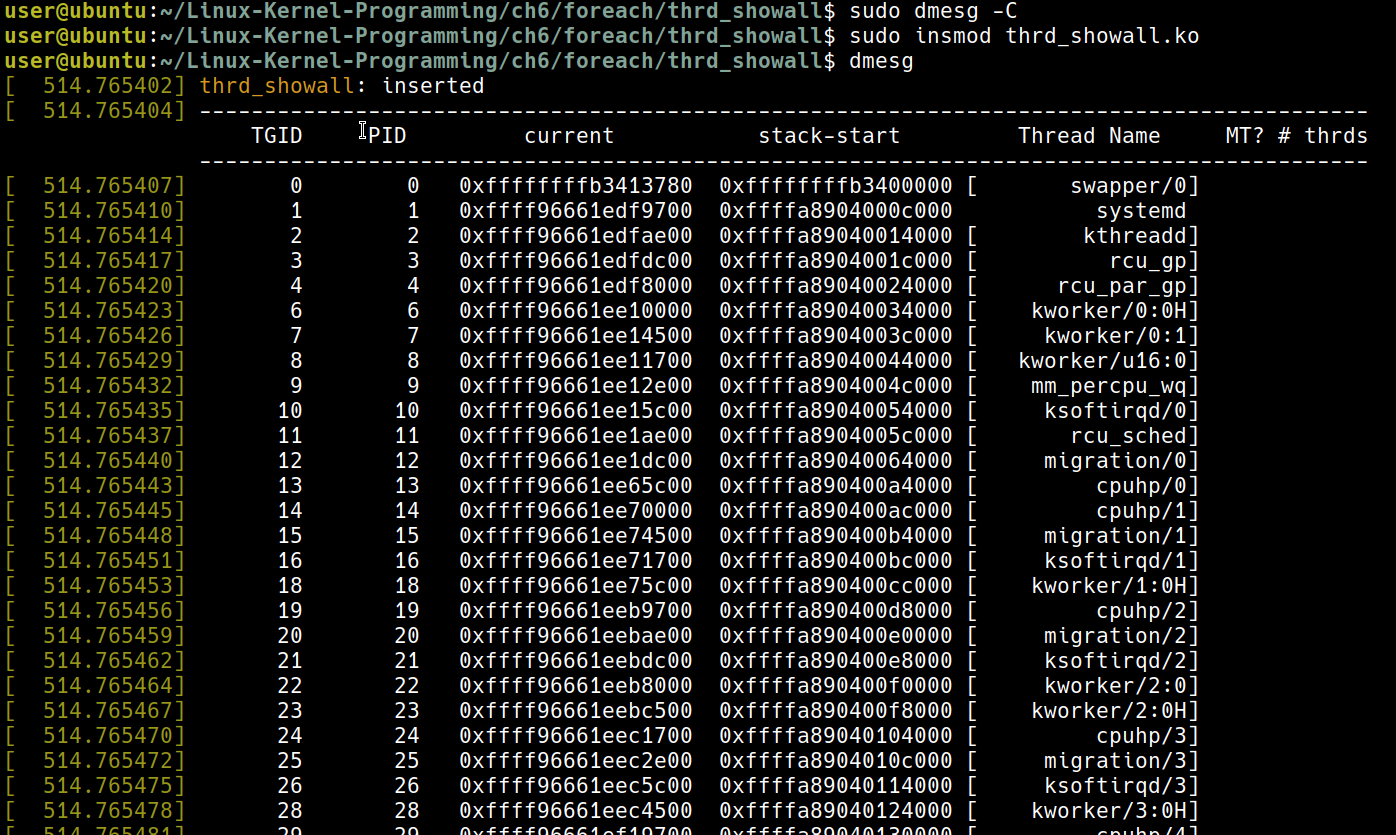
Differentiating between the process and thread – the TGID and the PID
- 同一個 process 的不同 thread 會有一樣的 TGID
- 不同的 thread 就會有不同的 PID
看下面的例子會比較容易理解
user@ubuntu:~/Linux-Kernel-Programming/ch6/foreach/thrd_showall$ dmesg
[  514.765402 ] thrd_showall: inserted
[  514.765404 ] ------------------------------------------------------------------------------------------
                   TGID     PID         current           stack-start         Thread Name     MT? # thrds
               ------------------------------------------------------------------------------------------
[...]
[  514.765778 ]      998      998   0xffff96660763ae00  0xffffa89040894000             snapd   14
[  514.765780 ]      998     1267   0xffff96661cd39700  0xffffa89040b90000             snapd
[  514.765783 ]      998     1268   0xffff96661cd38000  0xffffa8904080c000             snapd
[  514.765786 ]      998     1269   0xffff96661cd3dc00  0xffffa89040df0000             snapd
[  514.765788 ]      998     1270   0xffff96661cc78000  0xffffa89040ba8000             snapd
[  514.765791 ]      998     1271   0xffff96661cd3c500  0xffffa89040df8000             snapd
[  514.765794 ]      998     1273   0xffff966608bb8000  0xffffa89040d98000             snapd
[  514.765797 ]      998     1274   0xffff96661cc7ae00  0xffffa890404d8000             snapd
[  514.765799 ]      998     1298   0xffff96661c7b0000  0xffffa89041038000             snapd
[  514.765802 ]      998     1302   0xffff9666093ec500  0xffffa89041070000             snapd
[  514.765805 ]      998     1377   0xffff96661cc7dc00  0xffffa89040460000             snapd
[  514.765807 ]      998     1378   0xffff96661cd3ae00  0xffffa89041058000             snapd
[  514.765810 ]      998     1379   0xffff96661ccaae00  0xffffa89040c08000             snapd
[  514.765813 ]      998     1380   0xffff9666093e9700  0xffffa89041060000             snapd
Iterating over the task list III – the code
接著來看 thrd_showall.c 是如何寫成的
/*
 * ch6/foreach/thrd_showall/thrd_showall.c
 ***************************************************************
 * This program is part of the source code released for the book
 *  "Linux Kernel Programming"
 *  (c) Author: Kaiwan N Billimoria
 *  Publisher:  Packt
 *  GitHub repository:
 *  https://github.com/PacktPublishing/Linux-Kernel-Programming
 *
 * From: Ch 6 : Kernel and MM Internals Essentials
 ****************************************************************
 * Brief Description:
 * This kernel module iterates over the task structures of all *threads*
 * currently alive on the box, printing out some details.
 * We use the do_each_thread() { ...  } while_each_thread() macros to do
 * so here.
 *
 * For details, please refer the book, Ch 6.
 */
#include <linux/init.h>
#include <linux/module.h>
#include <linux/kernel.h>
#include <linux/sched.h>     /* current() */
#include <linux/version.h>
#if LINUX_VERSION_CODE > KERNEL_VERSION(4, 10, 0)
#include <linux/sched/signal.h>
#endif

#define OURMODNAME   "thrd_showall"

MODULE_AUTHOR("Kaiwan N Billimoria");
MODULE_DESCRIPTION("LKP book:ch6/foreach/thrd_showall:"
" demo to display all threads by iterating over the task list");
MODULE_LICENSE("Dual MIT/GPL");
MODULE_VERSION("0.1");

/* Display just CPU 0's idle thread, i.e., the pid 0 task,
 * the (terribly named) 'swapper/n'; n = 0, 1, 2,...
 * Again, init_task is always the task structure of the first CPU's
 * idle thread, i.e., we're referencing swapper/0.
 */
static inline void disp_idle_thread(void)
{
    struct task_struct *t = &init_task;

    /* We know that the swapper is a kernel thread */
    pr_info("%8d %8d   0x%px  0x%px [%16s]\n",
        t->pid, t->pid, t, t->stack, t->comm);

}

static int showthrds(void)
{
    struct task_struct *g = NULL, *t = NULL; /* 'g' : process ptr; 't': thread ptr */
    int nr_thrds = 1, total = 1;    /* total init to 1 for the idle thread */
#define BUFMAX      256
#define TMPMAX      128
    char buf[BUFMAX], tmp[TMPMAX];
    const char hdr[] =
"------------------------------------------------------------------------------------------\n"
"    TGID     PID         current           stack-start         Thread Name     MT? # thrds\n"
"------------------------------------------------------------------------------------------\n";

    pr_info("%s", hdr);
    disp_idle_thread();

    /*
     * The do_each_thread() / while_each_thread() is a pair of macros that iterates over
     * _all_ task structures in memory.
     * The task structs are global of course; this implies we should hold a lock of some
     * sort while working on them (even if only reading!). So, doing
     *  read_lock(&tasklist_lock);
     *  [...]
     *  read_unlock(&tasklist_lock);
     * BUT, this lock - tasklist_lock - isn't exported and thus unavailable to modules.
     * So, using an RCU read lock is indicated here (this has been added later to this code).
     * FYI: a) Ch 12 and Ch 13 cover the details on kernel synchronization.
     *      b) Read Copy Update (RCU) is a complex synchronization mechanism; it's
     * conceptually explained really well within this blog article:
     *  https://reberhardt.com/blog/2020/11/18/my-first-kernel-module.html
     */
    rcu_read_lock();
    do_each_thread(g, t) {     /* 'g' : process ptr; 't': thread ptr */
        task_lock(t);

        snprintf(buf, BUFMAX-1, "%8d %8d ", g->tgid, t->pid);

        /* task_struct addr and kernel-mode stack addr */
        snprintf(tmp, TMPMAX-1, "  0x%px", t);
        /*
         * To concatenate the temp string to our buffer, we could go with the
         * strncat() here; flawfinder, though, points out this is potentially
         * dangerous; so we simply use another snprintf() to achieve the same.
         * Why not use strlcat() instead? Here, it runs into trouble - being
         * called in an atomic context, which isn't ok (due to the
         * might_sleep() within it's code)...
         */
        snprintf(buf, BUFMAX-1, "%s%s  0x%px", buf, tmp, t->stack);

        if (!g->mm) {   // kernel thread
        /* One might question why we don't use the get_task_comm() to obtain
         * the task's name here; the short reason: it causes a deadlock! We
         * shall explore this (and how to avoid it) in some detail in Ch 17 -
         * Kernel Synchronization Part 2. For now, we just do it the simple way
         */
            snprintf(tmp, TMPMAX-1, " [%16s]", t->comm);
        } else {
            snprintf(tmp, TMPMAX-1, "  %16s ", t->comm);

        }
        snprintf(buf, BUFMAX-1, "%s%s", buf, tmp);

        /* Is this the "main" thread of a multithreaded process?
         * We check by seeing if (a) it's a userspace thread,
         * (b) it's TGID == it's PID, and (c), there are >1 threads in
         * the process.
         * If so, display the number of threads in the overall process
         * to the right..
         */
        nr_thrds = get_nr_threads(g);
        if (g->mm && (g->tgid == t->pid) && (nr_thrds > 1)) {
            snprintf(tmp, TMPMAX-1, " %3d", nr_thrds);
            snprintf(buf, BUFMAX-1, "%s%s", buf, tmp);

        }

        snprintf(buf, BUFMAX-1, "%s\n", buf);
        pr_info("%s", buf);

        total++;
        memset(buf, 0, sizeof(buf));
        memset(tmp, 0, sizeof(tmp));
        task_unlock(t);
     } while_each_thread(g, t);
    rcu_read_unlock();

    return total;

}

static int __init thrd_showall_init(void)
{
    int total;

    pr_info("%s: inserted\n", OURMODNAME);
    total = showthrds();
    pr_info("%s: total # of threads on the system: %d\n",
        OURMODNAME, total);

    return 0;       /* success */

}

static void __exit thrd_showall_exit(void)
{
    pr_info("%s: removed\n", OURMODNAME);

}

module_init(thrd_showall_init);
module_exit(thrd_showall_exit);